> ## Documentation Index
> Fetch the complete documentation index at: https://www.ayrshare.com/docs/llms.txt
> Use this file to discover all available pages before exploring further.
# n8n
> Connect n8n's AI Agent to the Ayrshare MCP Server to publish, schedule, and analyze across 13 social networks, with no per-platform API code.
export const XByoNotice = () =>
Targeting X/Twitter? Starting March 31, 2026, all X operations require your own API credentials. After linking X via OAuth, include these 2 headers in your request:
X-Twitter-OAuth1-Api-Key — Your API Key (Consumer Key)
X-Twitter-OAuth1-Api-Secret — Your API Key Secret (Consumer Secret)
One-time setup per Ayrshare account. You create one X Developer App and reuse the same API Key and Secret across every sub-profile / end-user you link. You do not create a new app per customer.
Not linked yet? See the full setup guide to connect your X account.
Your keys are never logged or stored by Ayrshare.
;
n8n is where you wire your tools together. Ayrshare is the one API that publishes to Facebook, Instagram, LinkedIn, YouTube, TikTok, Pinterest, Reddit, Threads, Bluesky, Telegram, Google Business Profile, Snapchat, and X in a single call. Connect them with the [Ayrshare MCP Server](/additional/mcp-action-server) and your n8n AI Agent can run the whole loop on its own: draft a post, validate it against each network's rules, publish or schedule it, then read the analytics back.
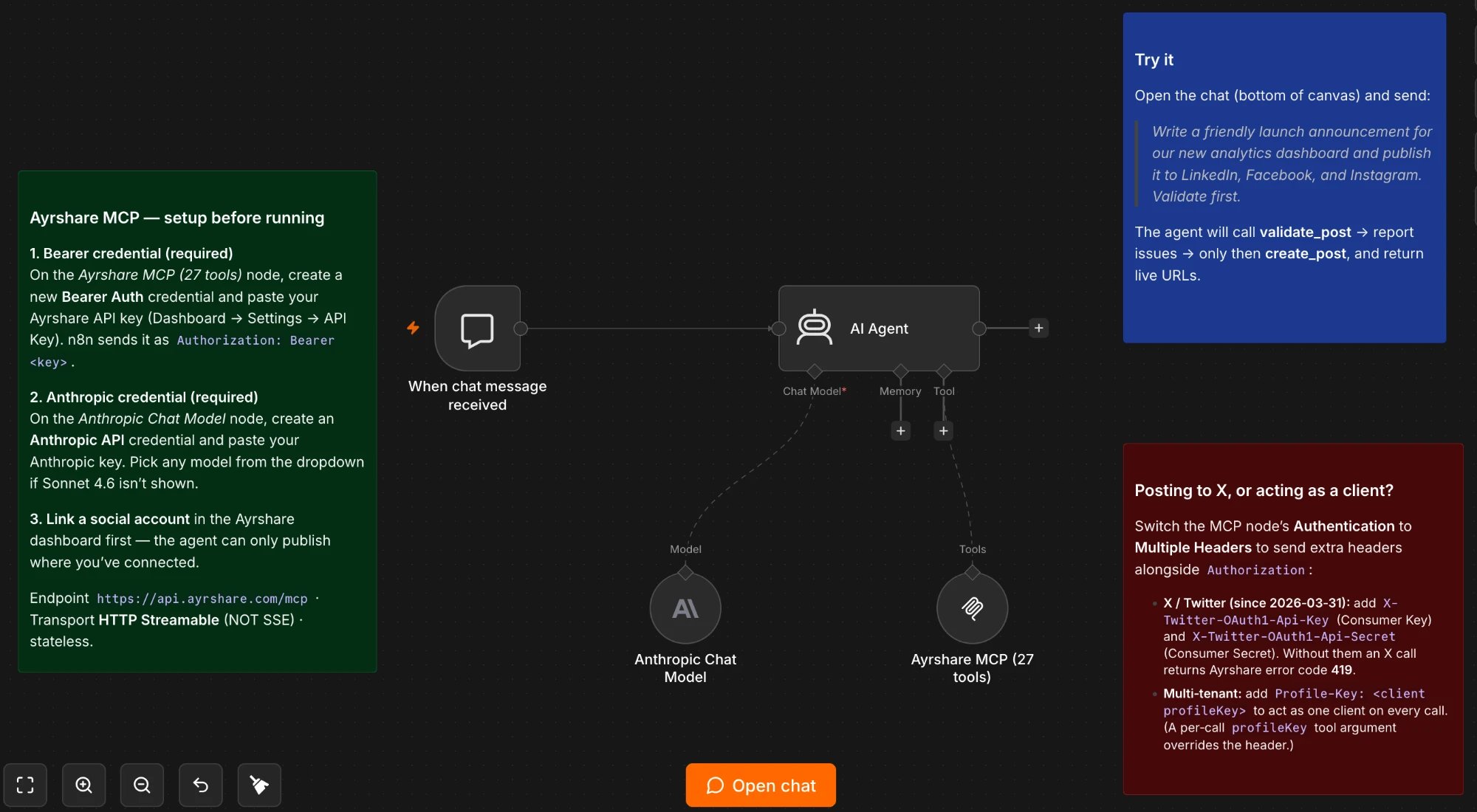 Because the MCP Server is a hosted Streamable HTTP endpoint, you connect it with n8n's built-in **MCP Client Tool** node. There is nothing to host, no custom code, and no community node to install. You point one node at one URL and your agent gets all 27 social tools.
The workflow shown above, ready to import: Chat Trigger, AI Agent, an Anthropic chat model, and the Ayrshare MCP node pre-wired with the validate-first system prompt.
To use it: in n8n, **Workflows → Import from file**, select the JSON, then create the two credentials it expects (a **Bearer Auth** credential holding your Ayrshare key, and an **Anthropic API** credential). The two warning badges clear once the credentials are attached. Self-hosted instances need outbound access to `api.ayrshare.com` and your model provider.
This guide covers the MCP-first path end to end. If you would rather build a fixed, non-agent workflow, there is a short [REST fallback](#rest-fallback-no-agent) at the end.
## Why MCP instead of writing API calls
You can call Ayrshare's REST API directly from an HTTP Request node, which is fine for fixed, predictable workflows. The MCP Server earns its place when an LLM is in the loop:
Because the MCP Server is a hosted Streamable HTTP endpoint, you connect it with n8n's built-in **MCP Client Tool** node. There is nothing to host, no custom code, and no community node to install. You point one node at one URL and your agent gets all 27 social tools.
The workflow shown above, ready to import: Chat Trigger, AI Agent, an Anthropic chat model, and the Ayrshare MCP node pre-wired with the validate-first system prompt.
To use it: in n8n, **Workflows → Import from file**, select the JSON, then create the two credentials it expects (a **Bearer Auth** credential holding your Ayrshare key, and an **Anthropic API** credential). The two warning badges clear once the credentials are attached. Self-hosted instances need outbound access to `api.ayrshare.com` and your model provider.
This guide covers the MCP-first path end to end. If you would rather build a fixed, non-agent workflow, there is a short [REST fallback](#rest-fallback-no-agent) at the end.
## Why MCP instead of writing API calls
You can call Ayrshare's REST API directly from an HTTP Request node, which is fine for fixed, predictable workflows. The MCP Server earns its place when an LLM is in the loop:
- **The agent picks the tool.** Describe the goal ("publish this to our business channels and schedule the follow-up for Tuesday") and the agent chooses `validate_post`, `create_post`, and the right parameters itself.
- **Validation before anything goes live.** `validate_post` dry-runs your content against each platform's length, format, and media rules, so the agent does not ship a post a network will reject.
- **One call, many networks.** A single `create_post` fans out to every linked platform.
- **Platform changes are Ayrshare's problem.** When a network changes its API, Ayrshare maintains the integration and your workflow keeps working.
- **Same rules as the REST API.** Every MCP tool call runs in-process through the same Ayrshare API chain: same auth, rate limits, quota, and validation. There is no separate behavior to learn.
## How it connects
The **AI Agent** node is the brain. The **MCP Client Tool** sub-node attaches to it, connects to the Ayrshare MCP Server at `https://api.ayrshare.com/mcp`, discovers the available tools, and exposes them to the agent. When the agent acts, the node dispatches the call to Ayrshare, which publishes to the networks.
```
Trigger -> AI Agent (+ Chat Model) -> MCP Client Tool -> Ayrshare MCP Server -> 13 networks
```
For the endpoint, transport, and authentication details, see [Connect & Setup](/additional/mcp-action-connect). For the full tool list, see the [Tool Catalog](/additional/mcp-action-tools).
## Prerequisites
- An **n8n instance** (Cloud or self-hosted) on a recent version with the AI Agent and MCP Client Tool nodes. The MCP Client Tool node is built in. You do not need a community node, because the Ayrshare server speaks Streamable HTTP.
- An **Ayrshare account and API key** (Dashboard → Settings → API Key), or start a [free trial](https://billing.ayrshare.com/b/9B6bJ15Oidr9fz615u1Nu0h).
- **At least one social account linked** in Ayrshare. The agent can only publish where you have connected.
- A **chat model credential** for the AI Agent node (Anthropic, OpenAI, etc.).
- *(Optional)* A **Business or Enterprise plan** if you will manage multiple clients via sub-profiles.
## Set up the MCP Client Tool node
Open or create a workflow and add an **AI Agent** node (under the *Advanced AI* nodes).
On the AI Agent node, click the **Tool** connector and add an **MCP Client Tool** node. Configure it:
| Field | Value |
| -------------------- | --------------------------------------------------- |
| **Endpoint** | `https://api.ayrshare.com/mcp` |
| **Server Transport** | `HTTP Streamable` |
| **Authentication** | `Bearer Auth` |
| **Tools to Include** | `All` (or `Selected` to expose only specific tools) |
For **Credential**, create a new **Bearer Auth** credential and paste your Ayrshare API key as the token. n8n sends it as `Authorization: Bearer YOUR_API_KEY`. When you save, n8n connects and lists the 27 tools.
Attach a **Chat Model** sub-node and select your model credential. Give the agent a system prompt that sets the rules, for example:
> You are a social media assistant with access to Ayrshare tools. Before publishing anything, always call `validate_post` first and report any issues. Only call `create_post` after validation passes. Default to the platforms the user names; if none are named, ask. Never invent media URLs; only use URLs the user provides, and confirm them with `validate_media` when in doubt.
For testing, the **Manual Trigger** or **Chat Trigger** is easiest. For production, use whatever kicks off the workflow (schedule, webhook, form, new row in a sheet).
**Use HTTP Streamable, not SSE.** The Ayrshare MCP Server uses the modern Streamable HTTP transport and is stateless. n8n's SSE option is deprecated, and the server rejects the SSE stream. Always choose **HTTP Streamable**.
## The tool surface
Your agent sees all 27 tools through the one MCP node. You rarely call them by name; you describe intent and the agent selects. The domains are Posts, History, Analytics, Comments, Messages, Profiles, Media, Generate, Webhooks, and Errors. For the complete list with each tool's purpose and scope, see the [Tool Catalog](/additional/mcp-action-tools).
Two stand out for safety: **`validate_post`** dry-runs a post with the same input as `create_post` but publishes nothing, and **`explain_error`** turns any Ayrshare error code into a plain-English cause and fix, so the agent can self-diagnose.
## Example 1: draft, validate, and publish from a chat message
The "hello world" of this integration. Trigger the workflow with a chat message or form, and let the agent do the rest.
- **Trigger:** Chat Trigger (or a Form Trigger with a "what should we post?" field).
- **Prompt to the agent:** *"Write a friendly launch announcement for our new analytics dashboard and publish it to LinkedIn, Facebook, and Instagram. Validate first."*
What the agent does on its own: it calls `validate_post` with your copy and the three platforms; if Instagram flags a missing image it tells you instead of failing silently; once validation passes it calls `create_post` and returns the live post URLs. Because validation runs first, you find out about a problem before anything is public.
## Example 2: auto-publish new content across your channels
Turn a content source into multi-network posts without touching it.
- **Trigger:** RSS Read node on your blog feed, a webhook from your CMS, or a new row in Google Sheets or Airtable.
- **AI Agent step:** *"Summarize this article into a short social post with 2 to 3 relevant hashtags, then validate and publish to LinkedIn, Facebook, and Threads."*
- Optionally add a [human-in-the-loop](#keep-a-human-in-the-loop) approval before the `create_post` step so a person signs off.
You can lean on `recommend_hashtags` for data-driven tags and `generate_post` if you want Ayrshare to draft the copy rather than your chat model.
## Example 3: weekly analytics digest
Run the loop in reverse: read performance and report it.
- **Trigger:** Schedule node, for example every Monday at 8am.
- **AI Agent step:** *"Pull last week's account analytics for LinkedIn, Instagram, and Facebook, and summarize the top 3 posts by engagement."*
- The agent uses `get_social_network_analytics` for account-level numbers and `get_post_analytics` for individual posts, then you pipe its summary to a **Slack**, **Gmail**, or **Notion** node.
A note on cadence: most posts get the bulk of their engagement in the first 24 hours, and metrics do not update by the second. A daily or weekly schedule is plenty. Do not poll analytics every few minutes or you will hit rate limits for no new data.
## Acting on behalf of clients (multi-tenant)
If you manage social for multiple clients, Ayrshare's profiles let one account post to many separate sets of linked accounts. On a Business or Enterprise plan you have two ways to target a client from n8n:
- **Per connection:** add a `Profile-Key` header to the MCP Client Tool node (use **Multiple Headers** auth so you can send both `Authorization` and `Profile-Key`). Every call on that node then acts as that client. Good when a workflow serves one client.
- **Per call:** many tools accept a `profileKey` argument, which the agent can set per action. When both are present, the [per-call argument wins](/additional/mcp-action-connect#precedence-argument-wins-over-header). Good when one workflow routes across clients.
To onboard a new client, the agent can call `create_profile` and then `generate_jwt_social_linking_url` to mint a hosted page where the client links their own accounts. No credentials pass through your workflow.
## Posting to X/Twitter
In n8n, switch the MCP Client Tool node's **Authentication** to **Multiple Headers** and add the two `X-Twitter-OAuth1-*` headers alongside `Authorization`. It is a one-time setup per Ayrshare account, and the same key pair applies to every profile. For everything else (Facebook, Instagram, LinkedIn, YouTube, TikTok, and the rest) no extra headers are needed. See [Connect & Setup → X/Twitter BYO credentials](/additional/mcp-action-connect#xtwitter-byo-credentials).
## Keep a human in the loop
The MCP tools make it trivial for an agent to publish, which is exactly why you should gate it. Two cheap safeguards:
- **Always validate first.** Bake "call `validate_post` before `create_post`" into the system prompt. Validation publishes nothing and catches platform-rule violations early.
- **Add an approval step.** Insert n8n's **Send and Wait for Response** (Slack or email) node between the draft and the publish action so a person approves before anything goes live. For scheduled content, the agent can use `update_post` to revise an awaiting-approval post.
## REST fallback (no agent)
If you want a fixed, deterministic workflow with no LLM, skip MCP and call the REST API with an **HTTP Request** node:
- **Method:** `POST`
- **URL:** `https://api.ayrshare.com/api/post`
- **Authentication:** Header Auth, `Authorization: Bearer YOUR_API_KEY`
```json theme={"system"}
{
"post": "Excited to announce our new feature!",
"platforms": ["facebook", "linkedin", "instagram"],
"mediaUrls": ["https://example.com/image.jpg"],
"scheduleDate": "2026-07-01T10:00:00Z"
}
```
Use the API host `api.ayrshare.com`, not the dashboard host `app.ayrshare.com`. (`app.ayrshare.com` will accept API calls, but it is not the documented endpoint and can return intermittent [502/504 gateway errors](/help-center/technical-support/response_bad_gateway_502_or_504_error), so always use `api.ayrshare.com`.) The same pattern works for the other [REST endpoints](/apis/overview). This is the right tool when the workflow is fully predictable and you do not need an agent deciding anything.
## Troubleshooting
| Symptom | Likely cause | Fix |
| --------------------------------------------------------- | ---------------------------------------------------------- | ---------------------------------------------------------------------------------------------------------------------------- |
| Tool call returns `403` / code `102`, "API Key not valid" | Bad or missing API key | Check the Bearer Auth credential holds your exact Ayrshare key. Re-save the node after changing it. |
| n8n cannot connect to the MCP server | Wrong transport or endpoint | Endpoint must be `https://api.ayrshare.com/mcp`; transport must be **HTTP Streamable**, not SSE. |
| X/Twitter post fails with error `419` | Missing X BYO credentials | Add the two `X-Twitter-OAuth1-*` headers via Multiple Headers auth. |
| Post fails for one platform only | That network is not linked, or a required field is missing | Link it in the dashboard; add `title` for YouTube, `title` + `subreddit` for Reddit, `mediaUrls` for Instagram. |
| Instagram post rejected | No media | Instagram requires `mediaUrls` for most post types. Have the agent confirm with `validate_media`. |
| Media attached as a file or binary does not appear | MCP is JSON-only | Reference media by public `mediaUrls` URL; the MCP path does not accept file uploads. Confirm the URL with `validate_media`. |
| Calls work, but act on the wrong client | Profile targeting | Set a `Profile-Key` header (per connection) or `profileKey` argument (per call); the argument wins if both are set. |
| `429 Too Many Requests` | Polling too often | Reduce analytics and comment polling frequency; metrics do not update by the second. |
| Config change did not take effect | MCP connection initializes at session start | Re-save the node or restart the workflow after changing the key or headers. |
You can also expose the `explain_error` tool to the agent so it decodes any Ayrshare error code into a cause and fix on its own.
## Next steps
Endpoint, transport, authentication, profile targeting, and BYO credentials.
The 27 tools grouped by domain, with scope and purpose.
What the MCP Server is and how it maps to the Ayrshare API.
The same server, packaged for Claude Code.